Examiners: Form Status Indicators
Examiners: Form Status Indicators Overview
Status indicators are integral to the governance and audit process, integrated into the IT Audit Machine. They control the state of a given control or field on a form, representing the associated entity’s progress in complying with that control. These statuses, in turn, drive the metrics and reporting used to track overall ITAM compliance.
In this guide section, we will discuss status indicators and their use. We will also briefly discuss the reports that the data feeds into, though more detail on the Report Types is available in the Report Types section of the Guide.
Available Indicator States
The Form Status Indicators have four (5) possible states, each conveying different information about the field or control in question.
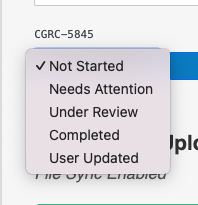
- Not Started: The current control hasn't been implemented or recorded.
- Needs Attention: A specific aspect of the form field requires user attention. This could be incomplete evidence or a problem with how the field was completed.
- Under Review: The field is currently under review by the examiner.
- Completed: All expected items in the field are provided, and the examiner now marks it as complete.
- User Updated: The user has changed some information in the field. Fields will automatically cycle to "User Updated" any time a change is made.
Accessing Status Indicators
Status Indicators are visible on almost every screen where the individual data fields of a form can be viewed. This includes editing a form, reviewing form data, and viewing specific reports. Status Indicators can only be changed by an examiner or administrator.
Your Roadmap to Risk Reduction is just 2 clicks away with Continuum GRC!
Call 1-888-896-6207 to get your roadmap to risk reduction underway.