Risk Scores
Status and Risk Scores provide examiners with a high-level way to track the health of their compliance efforts.
On every Examiner’s main dashboard, they have access to Risk and Completion measurements, represented by circular gauges like these:
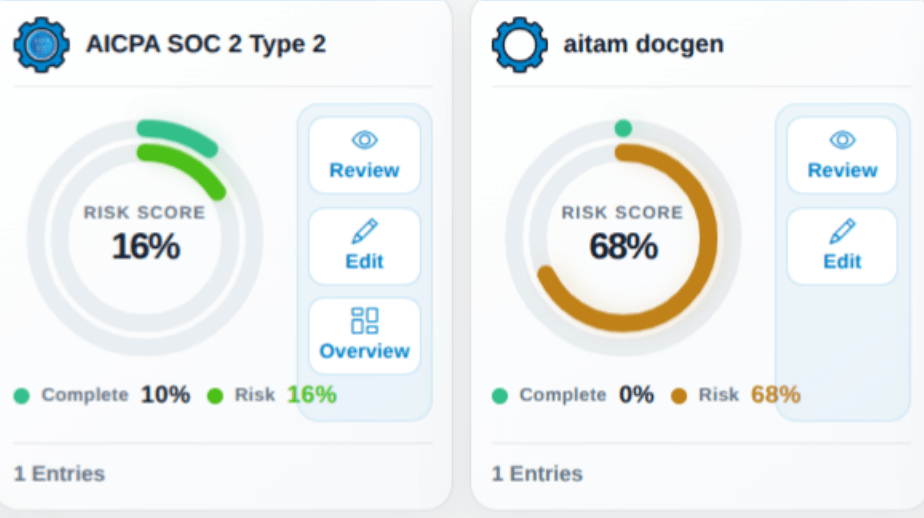
On this dashboard (accessible from your Workspace Menu), you’ll see a grid of module names with an associated risk score and color wheel. Each individual item represents a Form, its completion rate, and its risk score.
With a closer look, we can break down the elements of each module:
The color wheel contains two elements: the completion score (in green) is the outer ring, showing how many fields have been completed. Note that this doesn’t mean “fields that have data,” but rather fields that have been marked Completed by you or another examiner.
The Risk Score is the inner ring, and represents any risk associated with the data entered into the form based on the frameworks and scoring criteria used in that form. This ring changes from green to orange to red as the score rises. A lot of red or orange on your priorities dashboard could signal compliance issues that you should address.
Additionally, you’ll see two or three buttons on each module:
| Option | Function |
|---|---|
| Review | Navigate directly to the form review page. |
| Edit | Navigate directly to the form edit page. |
| Overview | Get a glimpse of each form field in the module, color-coded by completion and risk (if available). |